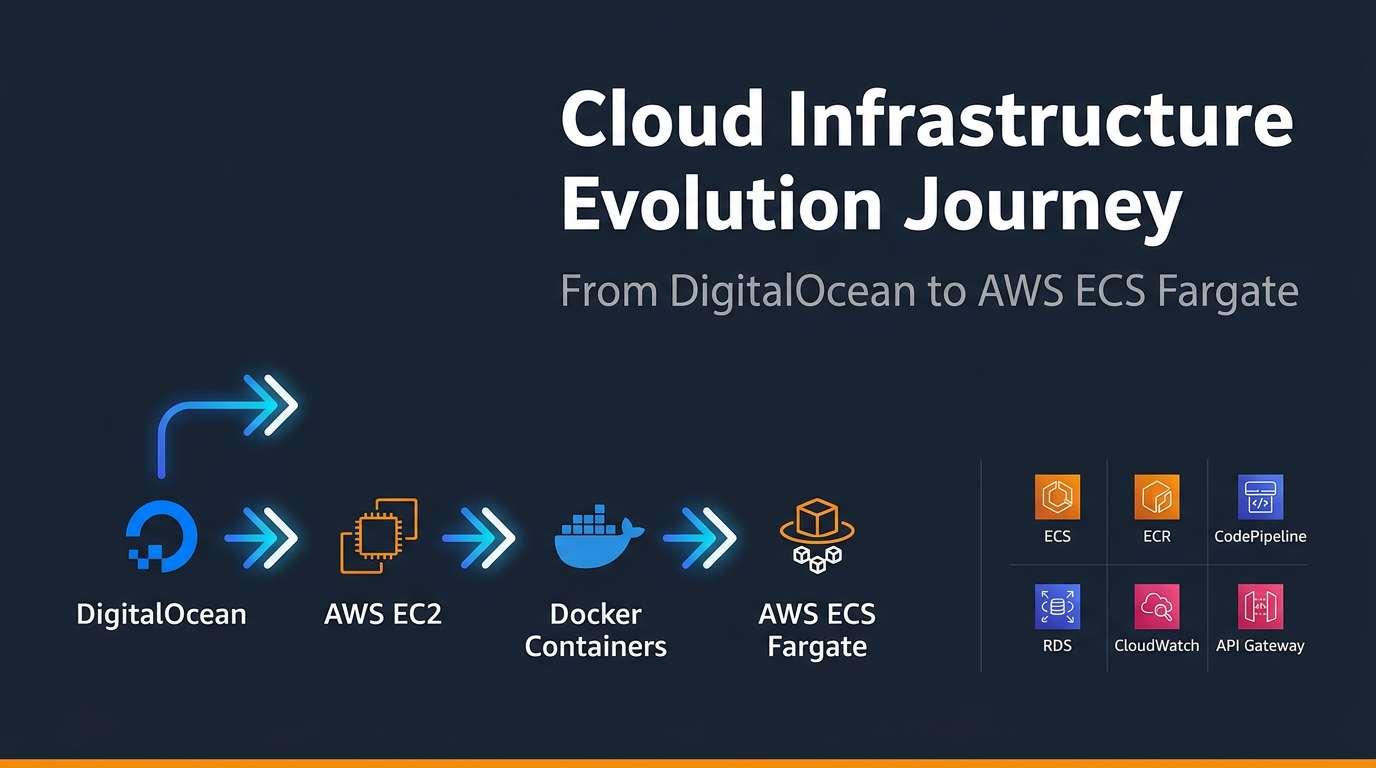
Zero Downtime, Zero Compromise: How We Moved a Live Platform from DigitalOcean to AWS ECS Fargate

Zero Downtime, Zero Compromise: How We Moved a Live Platform from DigitalOcean to AWS ECS Fargate

Phase 1: The Starting Point — DigitalOcean Hosting 

Infrastructure Overview 

Customer initial production environment was hosted on DigitalOcean Droplets — Linux-based virtual machines running the application directly on the host OS. While DigitalOcean offered simplicity and low initial cost, this setup quickly revealed significant limitations as customer scaled its client operations. 

Challenges Encountered 

Operational Bottlenecks 

  • Client feedback highlighted noticeable delays in receiving critical application updates, raising concerns about responsiveness and SLA adherence. 
  • Latency issues were observed in application response times and data loading, directly impacting end-user satisfaction. 

Infrastructure Rigidity 

  • DigitalOcean supports only Linux-based environments, limiting the flexibility needed for applications that may require a Windows-compatible runtime. 
  • Container orchestration capabilities were absent, making it difficult to manage application dependencies consistently across environments. 

Manual Deployment Burden 

  • Deployments relied entirely on manual scripts and custom tooling. 
  • Each release cycle required 1–2 engineers dedicating 6–7 hours per week solely for deployment oversight and maintenance. 
  • This manual approach introduced a high risk of human error and created deployment inconsistencies across environments.

Phase 2: Migration to AWS EC2 

Why EC2? 

As a first step toward modernization, Cogniv Technologies recommended migrating the customer workload to AWS EC2 (Elastic Compute Cloud). This move provided our customer with enterprise-grade infrastructure, deeper managed service integrations, and the foundation needed to adopt containerization in the next phase. 

What Changed 

  • The application was rehosted on EC2 instances within a properly architected AWS VPC, with security groups, subnets, and a NAT Gateway enforcing network isolation and security best practices. 
  • AWS RDS for MySQL replaced the self-managed database, offloading patching, backup automation, and storage scaling to AWS — allowing the team to focus on application development rather than database administration. 
  • AWS CloudTrail was enabled to capture a full audit trail of API activity across the account, supporting compliance and operational governance from day one. 
  • Amazon CloudWatch was configured for centralized logging, metrics collection, and alerting across all services. 
  • AWS Route 53 was used for DNS management, enabling reliable domain routing and health-check-based failover. 

Improvements Gained 

  • Eliminated DigitalOcean’s Linux-only platform constraint, opening the path to broader runtime support. 
  • Gained access to the full AWS service ecosystem for future integrations. 
  • Centralized monitoring and auditing replaced fragmented, manual log management. 
  • Database reliability improved significantly with RDS automated backups and multi-AZ capability. 

Remaining Gaps 

While the EC2 migration addressed infrastructure maturity, several challenges persisted: 

  • Applications still ran directly on EC2 instances without containerization, meaning environment inconsistencies between development and production remained. 
  • Deployment was still largely manual, continuing to consume significant engineering time. 
  • Scaling required manual intervention or basic Auto Scaling configurations, without fine-grained container-level resource management. 

 Phase 3: Containerization with Docker on EC2 

Adopting Docker 

To address environment consistency and dependency management, Cogniv Technologies led the effort to containerize the customer application using Docker. All application components were packaged into Docker images, with container images stored securely in Amazon ECR (Elastic Container Registry). 

What Changed 

  • Application workloads were containerized and deployed as Docker containers running on EC2 instances. 
  • Amazon ECR served as the private image registry, replacing any ad-hoc image storage and ensuring version-controlled, immutable container artifacts. 
  • Docker Compose was used to manage multi-container deployments locally and in staging environments, improving developer workflow consistency. 

Benefits Unlocked 

  • Environment Parity: Containers encapsulate all application dependencies, eliminating the classic “works on my machine” problem across development, staging, and production. 
  • Faster Onboarding: New engineers could spin up the full application stack locally using a single Docker command. 
  • Image Versioning: ECR enabled strict version control of container images, making rollbacks straightforward. 

Remaining Challenges 

Despite containerization benefits, managing Docker containers on EC2 still required: 

  • Manual EC2 instance management — patching, capacity planning, and instance health monitoring. 
  • No native service discovery, making inter-container communication in a microservices setup cumbersome. 
  • Scaling containers still required EC2-level intervention, not container-level auto-scaling. 
  • The deployment process, though improved, still lacked full automation and required engineer oversight. 

 Phase 4: Full Modernization — AWS ECS Fargate with CI/CD Automation 

The Final Architecture 

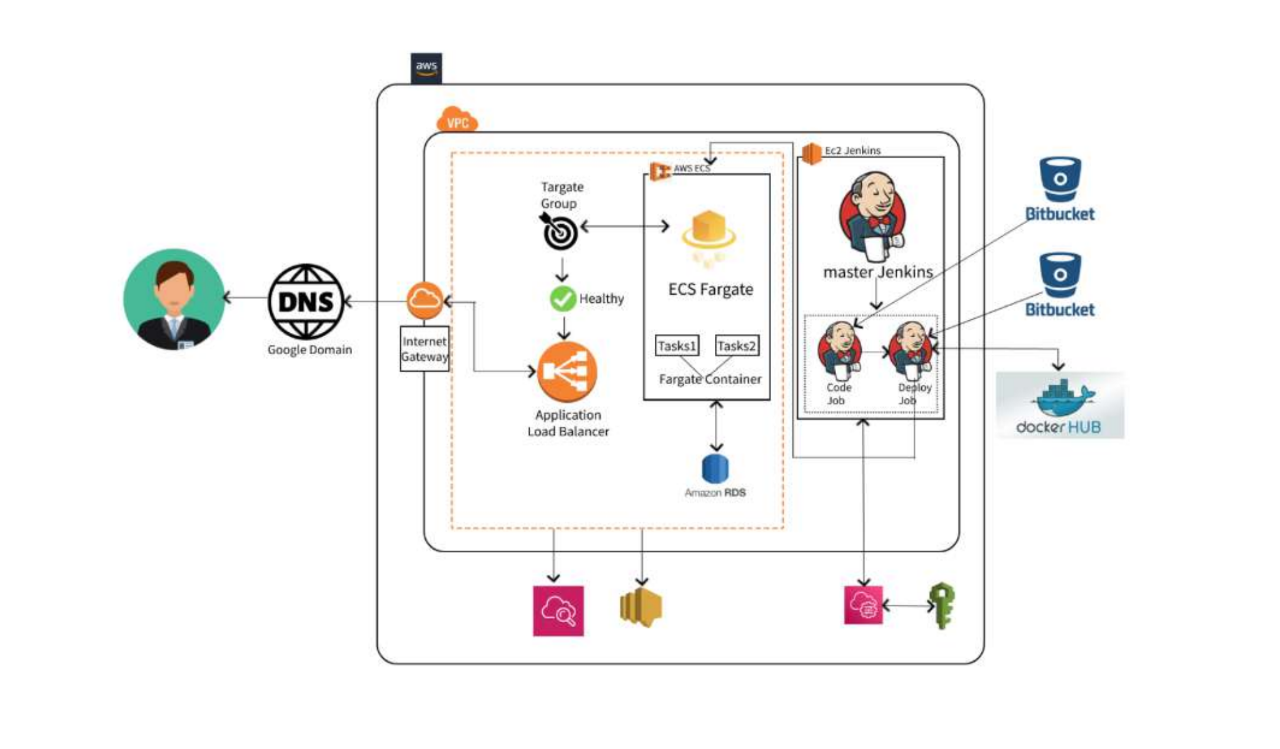
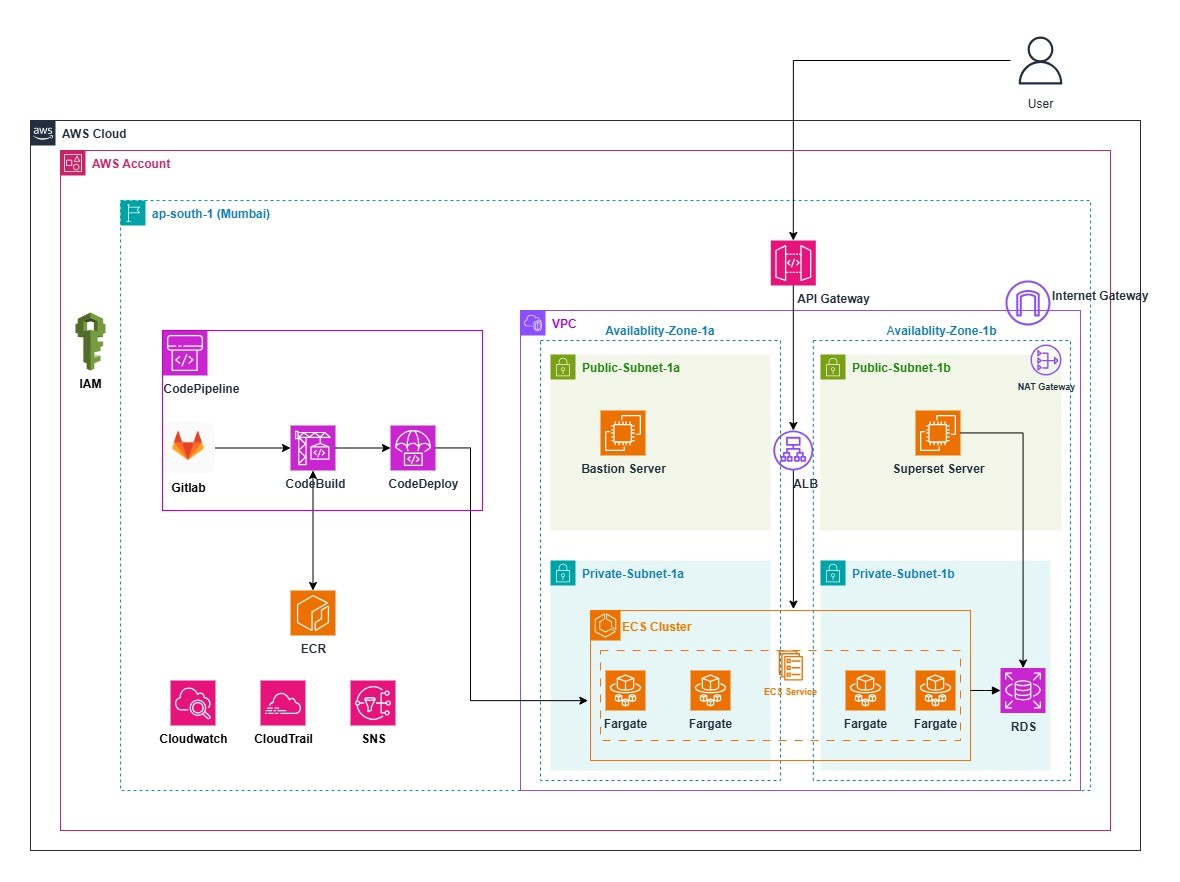
To eliminate the remaining infrastructure management overhead and fully automate the software delivery lifecycle, Cogniv Technologies migrated customer to AWS ECS Fargate  a serverless container orchestration service. This final phase consolidated all prior improvements into a cohesive, production-grade, fully managed architecture. 

Core Solution Components 

ECS Fargate — Serverless Container Hosting 

AWS ECS Fargate removes the need to provision or manage EC2 instances. Customer’s containers run in a fully managed serverless environment where AWS handles host-level patching, capacity, and scaling infrastructure. 

  • Blue/Green Deployment strategy was implemented via AWS CodeDeploy, enabling zero-downtime releases by running two identical environments in parallel and seamlessly shifting traffic only after the new version passes health checks. 
  • Deployment efficiency improved by approximately 99%, with zero downtime recorded across all production releases post-migration. 
  • ECS Service Discovery allows containers to communicate seamlessly within the VPC, enabling a clean microservices communication pattern without hardcoded endpoints. 

AWS CodePipeline — Fully Automated CI/CD 

A complete CI/CD pipeline was built using AWS CodePipelineCodeBuild, and CodeDeploy, automating the entire software delivery lifecycle from code commit to production deployment.

Deployment Metrics Post-Automation: 

  • End-to-end deployment duration: ~8 minutes from code commit to live traffic 
  • Engineering time saved: ~3 hours per week per engineer 
  • Deployment downtime: 0% 
  • Manual deployment steps: Eliminated entirely 

AWS API Gateway — Centralized API Management 

API Gateway acts as the unified entry point for all backend services, handling: 

  • Authentication and authorization enforcement 
  • Request and response transformation 
  • Throttling and rate limiting to prevent abuse 
  • Caching for improved response performance 
  • Centralized API lifecycle management 

This replaced direct EC2/container endpoint exposure, significantly improving the security posture and providing a consistent, manageable interface to customers distributed services. 

Amazon RDS — Fully Managed Relational Database 

Amazon RDS for MySQL continued from Phase 2, now more deeply integrated within the VPC and ECS networking fabric. AWS manages automated backups, software patching, storage auto-scaling, and failover — freeing the engineering team entirely from database infrastructure concerns. 

AWS CloudTrail — Governance and Audit 

CloudTrail captures a comprehensive, tamper-evident log of all API activity across the AWS environment. Events are stored in Amazon S3 for long-term archiving and integrated with CloudWatch for real-time security alerting — supporting internal compliance, operational auditing, and external regulatory requirements. 

Amazon CloudWatch — Unified Observability 

CloudWatch provides centralized monitoring across all services — ECS task metrics, RDS performance, API Gateway request rates, and CodePipeline execution status. Proactive alerting ensures the team is notified of anomalies before they impact end users. 

Lessons Learned 

Containerization Standardizes the Delivery Pipeline 

Adopting Docker and Amazon ECS introduced consistency across development, staging, and production environments. Packaging applications as immutable container images eliminated environment drift and made rollbacks trivially straightforward — simply redeploy the previous ECR image version. 

Incremental Migration Reduces Risk 

Rather than a single “lift-and-shift” migration, customer’s phased approach — DigitalOcean → EC2 → Docker → ECS Fargate — allowed each improvement to be validated before the next was introduced. This minimized risk, maintained continuity of client service, and allowed the engineering team to build confidence at each stage. 

Automation Is a Force Multiplier 

Implementing CI/CD with CodePipeline transformed how customers delivers software. What previously required hours of manual engineer effort now executes in eight minutes without human intervention. The elimination of manual steps directly reduced deployment errors and freed engineers to focus on product development rather than release management. 

Serverless Containers Are the Right Abstraction for Most Teams 

ECS Fargate proved that managing EC2 infrastructure is unnecessary overhead for application teams. By abstracting away host-level concerns, Fargate allowed customer’s engineers to operate at the container level the right abstraction for modern application delivery.

Final Architecture Diagram:
 

Leave a Reply

Your email address will not be published. Required fields are marked *

Latest Post

Executive Summary

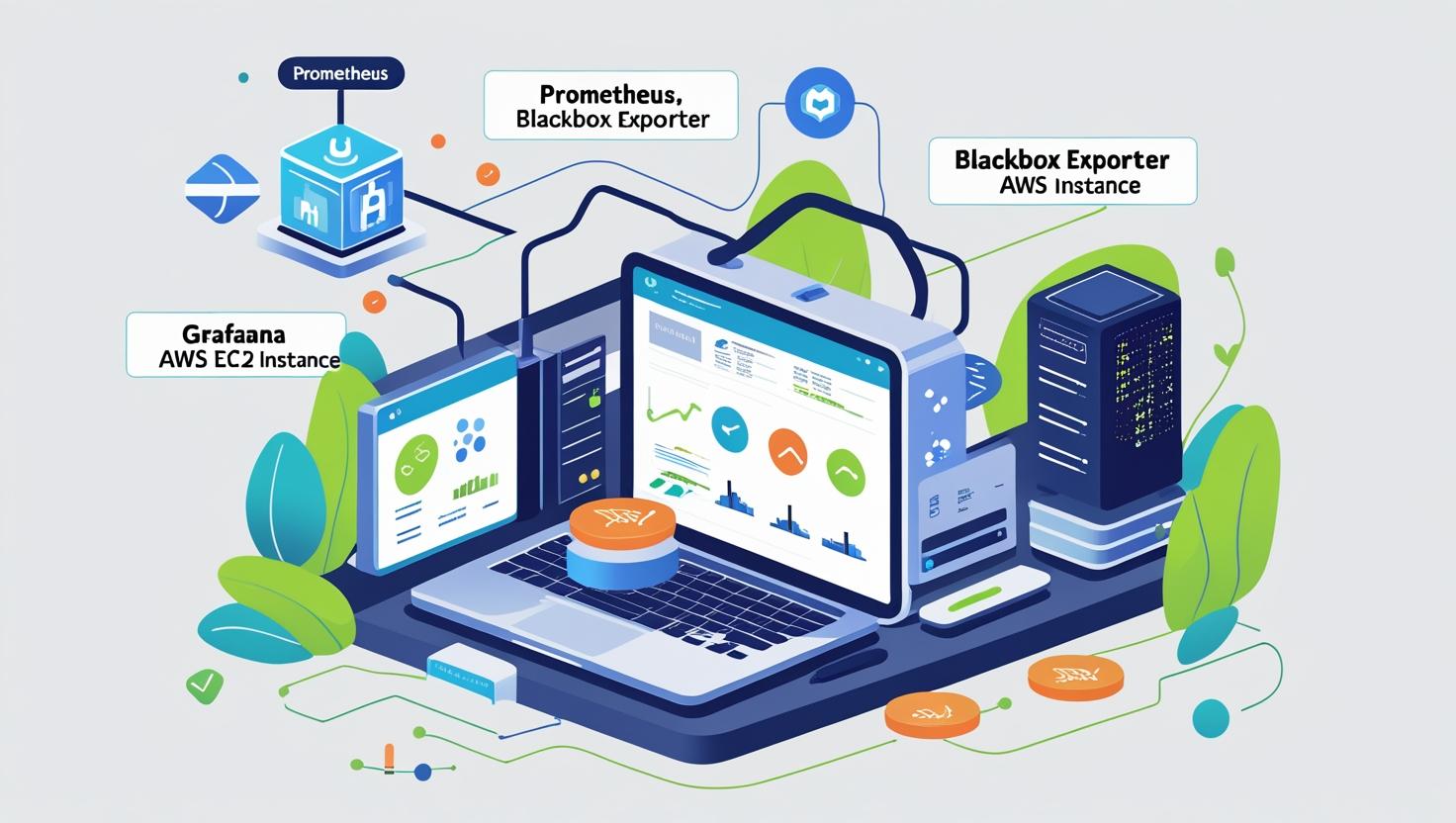
In today’s digital-first world, ensuring that your website and APIs are available and performing well is critical. A few minutes of downtime can result in lost customers, revenue, and trust. This blog explains how to set up Prometheus, Blackbox Exporter, and Grafana on an AWS EC2 instance to continuously monitor website uptime, SSL certificate validity, and response times with visual dashboards and alerts.

Problem

Businesses often face challenges in knowing when their websites or applications go down. Traditional monitoring tools can be expensive or complex to set up, leaving gaps in visibility. Without proper monitoring:

  • Downtime may go unnoticed until reported by users.

  • SSL certificates can expire unexpectedly.

  • Page load delays or DNS failures remain undetected.

The need for a reliable, open-source, and cost-effective solution to track website availability and performance metrics is clear.

Solution

By combining Prometheus for time-series data collection, Blackbox Exporter for probing website endpoints, and Grafana for visualization, you can build a robust monitoring solution that:

  • Continuously checks website uptime and response codes.

  • Monitors SSL expiry to prevent unexpected downtime.

  • Tracks latency, DNS resolution, and HTTP response times.

  • Provides real-time dashboards and alerting capabilities.

This solution is deployed on a Linux-based Ec2 instance and uses entirely open-source tools.

Prerequisites

Before starting, ensure you have the following:

  • An AWS EC2 instance (Ubuntu or Amazon Linux 2) with at least 2 GB RAM.

  • A domain or set of URLs you want to monitor.

  • Access to the EC2 instance via SSH.

  • Basic knowledge of Linux commands.

  • Ports 9090 (Prometheus), 9115 (Blackbox Exporter), and 3000 (Grafana) allowed in the EC2 Security Group.

Challenges

While implementing, you may encounter:

  • Firewall and Security Group restrictions preventing access to Grafana or Prometheus.

  • Incorrect scrape configurations in Prometheus resulting in no metrics collected.

  • CORS or SSL certificate errors when probing HTTPS websites.

  • Grafana authentication and datasource setup issues if not properly configured.

Scenario

Consider a financial services company that needs to ensure its customer-facing portal and API endpoints are always online. Using Prometheus and Blackbox Exporter, they want to:

  • Monitor their website URLs.

  • Receive early warnings if the SSL certificate is nearing expiry.

  • Visualize uptime history and response times in Grafana dashboards.

Step-by-Step Solution

1. Install Prometheus

Comments:

sudo useradd –no-create-home –shell /bin/false prometheus
sudo mkdir /etc/prometheus /var/lib/prometheus
sudo apt update && sudo apt install wget tar -y

cd /tmp
wget https://github.com/prometheus/prometheus/releases/download/v2.53.0/prometheus-2.53.0.linux-amd64.tar.gz
tar -xvf prometheus-2.53.0.linux-amd64.tar.gz
cd prometheus-2.53.0.linux-amd64/

sudo cp prometheus promtool /usr/local/bin/
sudo cp -r consoles console_libraries /etc/prometheus/
sudo cp prometheus.yml /etc/prometheus/prometheus.yml
sudo chown -R prometheus:prometheus /etc/prometheus /var/lib/prometheus

Create Prometheus service:

[Unit]
Description=Prometheus
Wants=network-online.target
After=network-online.target

[Service]
User=prometheus
ExecStart=/usr/local/bin/prometheus \
–config.file=/etc/prometheus/prometheus.yml \
–storage.tsdb.path=/var/lib/prometheus \
–web.listen-address=:9090 \
–web.enable-lifecycle

[Install]
WantedBy=multi-user.target

Enable and start:

sudo systemctl daemon-reexec
sudo systemctl enable prometheus
sudo systemctl start prometheus

2. Install Blackbox Exporter

cd /tmp
wget https://github.com/prometheus/blackbox_exporter/releases/download/v0.25.0/blackbox_exporter-0.25.0.linux-amd64.tar.gz
tar -xvf blackbox_exporter-0.25.0.linux-amd64.tar.gz
cd blackbox_exporter-0.25.0.linux-amd64/

sudo cp blackbox_exporter /usr/local/bin/
sudo mkdir /etc/blackbox_exporter
sudo cp blackbox.yml /etc/blackbox_exporter/

Create Blackbox service file as like below:

[Unit]
Description=Blackbox Exporter
After=network.target

[Service]
ExecStart=/usr/local/bin/blackbox_exporter \
–config.file=/etc/blackbox_exporter/blackbox.yml
Restart=always

[Install]
WantedBy=multi-user.target

Enable and start:

sudo systemctl daemon-reexec
sudo systemctl enable blackbox_exporter
sudo systemctl start blackbox_exporter

3. Configure Prometheus to Use Blackbox Exporter

Edit /etc/prometheus/prometheus.yml:

scrape_configs:
– job_name: ‘blackbox’
metrics_path: /probe
params:
module: [http_2xx]
static_configs:
– targets:
– https://example.com
– https://google.com
relabel_configs:
– source_labels: [__address__]
target_label: __param_target
– source_labels: [__param_target]
target_label: instance
– target_label: __address__
replacement: localhost:9115

Restart Prometheus:

sudo systemctl restart prometheus

4. Install Grafana

sudo apt-get install -y apt-transport-https software-properties-common
wget -q -O – https://packages.grafana.com/gpg.key | sudo apt-key add –
sudo add-apt-repository “deb https://packages.grafana.com/oss/deb stable main”
sudo apt-get update
sudo apt-get install grafana -y
sudo systemctl enable grafana-server
sudo systemctl start grafana-server

Access Grafana:

http://<EC2_PUBLIC_IP>:3000

(Default login: admin / admin)

5. Add Prometheus Datasource in Grafana

  • Go to Configuration → Data sources → Add data source

  • Select Prometheus

  • URL: http://localhost:9090

  • Save & Test

6. Import a Ready-made Blackbox Dashboard

  • Go to Dashboards → Import

  • Enter Dashboard ID: 7587

  • Select your Prometheus datasource

  • Click Import

You’ll now see uptime metrics including:

  • Status (UP/DOWN)

  • HTTP status code

  • SSL expiry

  • Response time and latency

Conclusion

With this setup, you now have a complete uptime monitoring solution using Prometheus, Blackbox Exporter, and Grafana on AWS EC2. This ensures you’re always aware of your website’s availability, SSL health, and performance without relying on expensive commercial tools.

Cogniv Technologies and Nunnari Labs Announce Strategic Collaboration to Deliver AI-Powered Cloud Solutions for Enterprises

Partnership combines Cogniv’s cloud and managed services expertise with Nunnari’s AIfirst product engineering capabilities to accelerate digital transformation.

Coimbatore, India – November 21, 2025

Coimbatore based Cogniv Technologies and Nunnari Labs today jointly announced a strategic collaboration to co-create and deliver enterprise-grade AI solutions built on secure, scalable cloud infrastructure.

The partnership will focus on bridging a critical gap many organizations face today —turning AI experimentation into operational reality. Together, the two firms will deliver a unified framework that makes it easier for businesses to design, deploy, and manage AI solutions that perform at scale.

What This Means for Clients

As artificial intelligence moves from experimentation to enterprise adoption, many organizations find themselves stuck between innovation and execution. Models may work in controlled environments, but scaling them securely, cost-eGectively, and in sync with existing systems remains a major hurdle.

The collaboration between Nunnari Labs and Cogniv Technologies aims to close that gap. Nunnari brings the depth of AI research, model development, and product engineering, while Cogniv provides the cloud backbone, DevOps discipline, and managed operations needed to make those AI systems run reliably at scale. Together, they oGer enterprises a practical path to bring AI into the core of their business – one that ensures performance in the real world, not just in prototypes.

For clients, this means dependable AI that integrates smoothly with their cloud environments, scales with demand, and adheres to the highest standards of transparency, security, and sustainability. More than just accelerating deployment, the partnership helps organizations translate innovation into measurable business outcomes.

The Collaboration

Through this partnership, both companies will jointly design and deploy solution accelerators across sectors such as manufacturing, healthcare, retail, and logistics. Clients will benefit from integrated oGerings that combine AI model development, cloud architecture, edge deployment, and ongoing managed services under one unified framework.

“Our partnership with Nunnari Labs is a strategic leap towards turning innovative AI concepts into real enterprise impact,” said Jeswanth Vijay, CEO, Cogniv Technologies. “Cogniv’s cloud and data expertise, combined with Nunnari’s cutting-edge AI engineering, will empower clients to scale AI solutions seamlessly. This is about transforming experimentation into execution and delivering future-ready AI Solution for business growth.”

Nunnari Labs’ core focuses on inclusive AI aligned with global standards like OECD.AI and NIST, adding a strong ethical dimension to the collaboration. Together, the two companies will help enterprises modernize infrastructure, automate operations, and embed intelligence into business processes without compromising on data security, transparency, or performance.

“At Nunnari Labs, our goal has always been to make advanced AI accessible, enterpriseready, and responsible. Partnering with Cogniv Technologies is a natural extension of that mission. Cogniv’s strength in cloud transformation perfectly complements our AI engineering expertise, allowing us to create solutions that are both scalable and impactful. Together, we’re building a future-ready ecosystem where cloud and AI converge to deliver real value for enterprises,” said Navaneeth Malingan, Founder & CEO, Nunnari Labs.

The timing of this collaboration reflects a broader market shift. As enterprises increasingly adopt GenAI, automation, and data-driven decision frameworks, the need for dependable infrastructure and ethical AI design has never been greater.

Both companies plan to launch joint solution frameworks and proof-of-concept projects in early 2026, followed by client onboarding and industry-specific AI accelerators blending innovation with accountability.
————————————————————————————————————–

About Cogniv Technologies

Cogniv Technologies is a technology consulting and services firm focused on cloud transformation, managed services, and DevOps. The company helps enterprises modernize their IT infrastructure, improve scalability, and ensure 24/7 reliability through customized cloud and automation solutions.

Learn more at www.cognivtech.com.

About Nunnari Labs

Nunnari Labs is an AI-first R&D and product engineering company dedicated to creating intelligent, sustainable, and human-centric technology solutions. With expertise spanning AI/ML, computer vision, MLOps, and intelligent industrial automation, the company works with global enterprises and research partners to turn advanced AI concepts into scalable business products.

Learn more at www.nunnarilabs.com.

Executive:

In today’s digital-first world, even the most beloved restaurants need a robust online presence. Pool Engineering known for its warm swimming pool experience, recognized the need to scale its digital operations to meet growing customer expectations. With the help of Cogniv Technologies and AWS, they embarked on a journey to modernize their infrastructure, streamline deployments, and enhance reliability.

The Challenge: Building a Digital Foundation

Pool Engineering team faced several hurdles at the start of their digital journey:

  • Uncertainty around hosting platforms
  • Scalability limitations and potential downtime
  • Lack of automated deployment and monitoring tools
  • Security vulnerabilities due to manual configurations

These challenges threatened to delay their online launch and compromise user experience during peak hours.

The Solution: AWS Elastic Container Service + CI/CD Automation

To overcome these obstacles, Cogniv Technologies implemented a fully automated, cloud native solution using AWS Elastic Container Service and a CI/CD pipeline

How the Partner Resolved the Customer Challenge

Designed a Fully Automated 3-Tier Architecture 

Utilized AWS CloudFormation to provision infrastructure as code. Included a secure VPC, application layer (Elastic Container Service), and database layer (Amazon RDS).

Implemented Secure Networking:

Deployed resources within a custom VPC for isolated and secure network access.Placed the RDS database in private subnets to protect sensitive data.

Deployed Scalable Application Hosting:

Used AWS Elastic Container Service to host the Dockerized application. Enabled automatic scaling, load balancing, and health monitoring.

Integrated GitHub for Source Control:

Enabled seamless version control and collaboration. Ensured traceability and transparency in code change

Established CI/CD Pipeline:

Configured AWS CodePipeline and CodeBuild for automated builds and deployments. Enabled continuous integration and delivery with minimal manual intervention.

Streamlined Deployment Workflow:

Automated the entire release process from code commit to production deployment. Reduced downtime and manual errors, ensuring consistent and reliable updates.

Enhanced Operational Efficiency:

Eliminated manual overhead, allowing the team to focus on innovation. Improved deployment speed and system reliability.

DevOps in Action: Practices That Powered the Transformation

Version Control: GitHub integration enabled seamless collaboration and change tracking.

CI/CD Pipelines: Automated deployment workflows ensured rapid, reliable software delivery.

Infrastructure as Code (IaC): AWS CloudFormation enabled consistent, version-controlled environment provisioning.

Technical Results:

– 85% faster deployments  from days to minutes
– Zero downtime during deployments
– 90% reduction in human error through automation
– 100% infrastructure consistency with IaC
– Improved scalability during peak traffic
– Shift from maintenance to innovation for the dev team


Lessons Learned:

– Plan network architecture early to ensure security and scalability.

– Automate everything — from infrastructure to deployments.

– Use managed services to reduce complexity and operational overhead.

– Integrate monitoring and security from the start.

About the Partner: Cogniv Technologies

Cogniv Technologies is an AWS Advanced Tier Partner specializing in:

– Cloud-native architecture

– DevOps and CI/CD automation

– FinOps and cloud cost optimization

Their customer-first approach and deep AWS expertise made them the ideal partner for Sanika’s digital transformation.

Conclusion:

Pool Engineering successfully transitioned from a manually managed setup to a modern, scalable cloud platform. With AWS and Cogniv Technologies, they now deliver a seamless digital experience that matches the excellence of their in-person dining  setting the stage
for future growth and innovation.

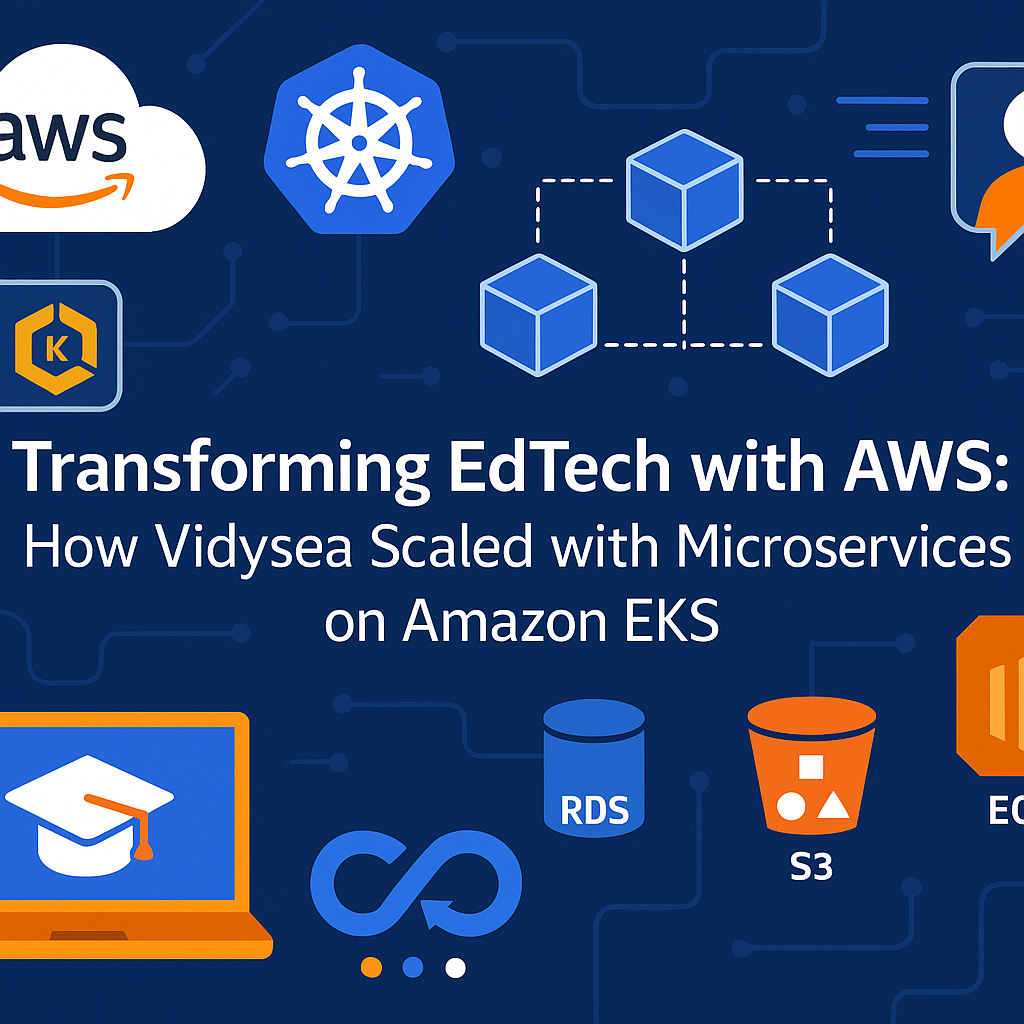
In the fast-evolving world of EdTech, agility, scalability, and reliability are non-negotiable. Vidysea, a platform dedicated to guiding professionals through their higher education journey, recognized this early. As their user base expanded and application complexity grew, they needed a robust infrastructure to match their ambitions. Here’s how they transformed their architecture with the help of AWS and Cogniv Technologies.

The Challenge: From Static Hosting to Scalable Infrastructure

Initially hosted on Vercel and later AWS Amplify, Vidysea faced growing pains:
– Performance bottlenecks during peak usage
– Limited autoscaling for backend services
– Manual infrastructure management leading to downtime
– Deployment inefficiencies slowing down feature delivery

These challenges highlighted the need for a more scalable, resilient, and automated solution.

The Solution: Migrating to Amazon EKS with Cogniv Technologies

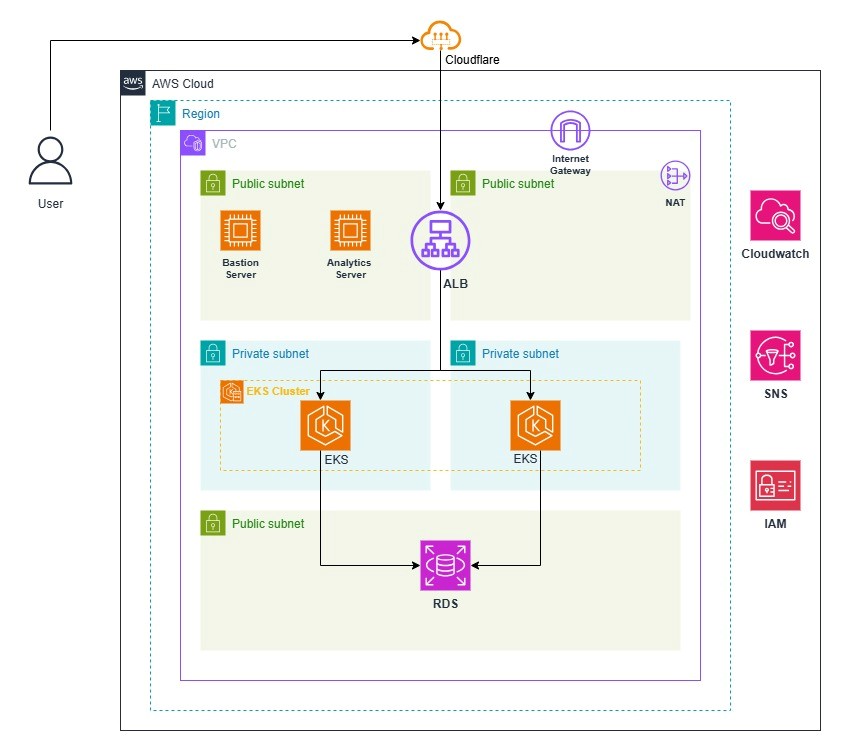
To meet these demands, Vidysea partnered with Cogniv Technologies, an AWS Advanced Tier Partner, to re-architect their platform using Amazon Elastic Kubernetes Service (EKS).

Key Components of the Solution:

Microservices Architecture: Transitioned from monolithic to containerized microservices using Docker and EKS.
CI/CD Pipelines: Automated deployments with GitHub-integrated pipelines for faster, error-free releases.
Container Registry: Used Amazon ECR for secure and scalable image storage.
Database Management: Leveraged Amazon RDS for PostgreSQL to ensure high availability and simplified scaling.
Security & Monitoring: Integrated AWS WAF, CloudWatch, and ALB for robust security and observability

Solution and AWS Architecture Design:

Cogniv Technologies collaborated closely with Vidysea to devise a customized product strategy aligned with their DevOps goals. Harnessing AWS’s best practices, we architected a resilient infrastructure to support Vidysea’ microservices architecture and facilitate future enhancements.


Key DevOps Practices Implemented:

Version Control

  • Integrated GitHub for managing application code.
  • Enabled seamless collaboration and meticulous change tracking.
  • Ensured transparency and accountability throughout development.

Continuous Integration (CI) and Continuous Delivery (CD)

  • Established CI/CD pipelines for automated build, package, and deployment.
  • Enabled rapid and reliable delivery of microservices to Amazon EKS.
  • Reduced manual errors and accelerated release cycles.

Containerization

  • Adopted Docker for consistent deployment environments.
  • Used Amazon EKS for scalable container orchestration.
  • Stored Docker images in AWS Elastic Container Registry (ECR) for simplified deployment and environment consistency.

AWS Services in Action

                               Service                                          Role
                  Amazon EKS Orchestrates containerized workloads with high availability
                  Amazon RDS Manages PostgreSQL databases with automated backups
                  Amazon S3 Stores application assets and backups securely
                  Amazon EC2 Provides scalable compute resources
                  AWS WAF Protects against common web exploits
                  Amazon ECR Hosts Docker images for seamless deployment
                  CloudWatch Monitors application health and performance

Technical Results

The transformation delivered measurable improvements:
– 90% reduction in deployment time
– 2x increase in deployment frequency (up to 10/day)
– 75% less manual intervention, reducing human error
– 20 hours/week saved per engineer
– 60% faster time-to-market for new features


———————————————————————————————-

Cogniv Tech transformed our deployment process – fast, reliable, and always available when needed   

-Manish Kumar

Director ,Vidysea 


Lessons Learned

– Containerization is key: Moving to Docker and EKS enabled better scalability and fault isolation.
– Automation accelerates innovation: CI/CD pipelines drastically improved deployment speed and reliability.
– Cloud-native architecture pays off: The shift to microservices empowered Vidysea to respond faster to user needs and security threats.

Cost Comparison: Amplify vs. EKS


Setup Monthly Cost Annual Cost
AWS Amplify (Legacy) $74.71
AWS EKS (New) $383.74 $4,604.88

About the Partner: Cogniv Technologies

Cogniv Technologies brings deep AWS expertise, industry knowledge, and a customer-first approach. As an AWS Advanced Tier Partner they specialize in:
– Cloud-native architecture
– DevOps and automation
– FinOps and cost optimization

Conclusion

Vidysea’s journey from static hosting to a dynamic, microservices-driven platform on AWS EKS is a testament to the power of cloud transformation. With Cogniv Technologies as their guide, they’ve built a future-ready platform that scales with their mission: empowering learners worldwide.

Executive Summary:

In today’s fast-paced software development environment, maintaining high code quality and security is vital. SonarQube is an industry-leading continuous inspection tool that enables teams to automatically detect coding issues and vulnerabilities early in the development cycle. This article details a step-by-step guide to installing and setting up SonarQube with PostgreSQL on Ubuntu 20.04 LTS, empowering your development teams to improve code quality through automated analysis.

Challenges:

As development teams grow, so does the complexity of codebases. Manual reviews become less effective at scaling code quality controls, and issues such as technical debt, code smells, security vulnerabilities, and inconsistent coding practices can go unnoticed until they cause significant setbacks. Teams also need tools that integrate seamlessly with their existing CI/CD pipelines and version control systems, such as GitHub.

Scenario:

Your company’s DevOps team is tasked with implementing a centralized code quality solution that integrates with your development workflows, particularly GitHub, and offers automated, detailed feedback on every code push. The goal is to set up a robust and scalable instance of SonarQube, making it easy for developers to analyze their projects and take action on identified issues.

Problem:

Without an effective system for continuous code analysis:

  • Teams lack visibility into code quality.

  • Security vulnerabilities can slip into production code.

  • It’s difficult to enforce coding standards and best practices.

  • Manual code reviews become a bottleneck.

Solution:

Setting up a dedicated SonarQube server using Docker or a regular instance provides an automated and user-friendly platform for code quality management. Connected with a PostgreSQL database, SonarQube will continuously analyze code, identify bugs, code smells, and security flaws, and report them via a web UI accessible to your development teams

Prerequisites:

Before starting the installation, ensure:

  • Operating System: Ubuntu 20.04 LTS (or compatible)

  • Access Level: Sudo privileges

  • Network Access: Ability to access GitHub and download packages

  • Java: OpenJDK 17 must be installed

  • System Resources: At least 2 vCPUs and 4GB RAM for SonarQube

  • Other: Internet connection, wget, unzip, and adequate disk spac

Implementation:

Below is a step-by-step breakdown for setting up SonarQube with PostgreSQL:

1. Update System Packages

sudo apt-get update

sudo apt-get upgrade -y

2. Install Java (OpenJDK 17)

sudo apt-get install openjdk-17-jdk -y

java -version

3. Install wget & unzip

sudo apt-get install wget unzip -y

4. Install & Configure PostgreSQL

Add PostgreSQL repository and install:

sudo sh -c ‘echo “deb http://apt.postgresql.org/pub/repos/apt/ $(lsb_release -cs)-pgdg main” >> /etc/apt/sources.list.d/pgdg.list’
wget -q https://www.postgresql.org/media/keys/ACCC4CF8.asc -O – | sudo apt-key add –
sudo apt-get install postgresql postgresql-contrib -y

Start & enable service:

sudo systemctl start postgresql
sudo systemctl enable postgresql

Create a SonarQube user and database:

sudo -u postgres createuser sonar

sudo -u postgres psql

ALTER USER sonar WITH ENCRYPTED PASSWORD ‘sonar@123’;

CREATE DATABASE sonarqube OWNER sonar;

GRANT ALL PRIVILEGES ON DATABASE sonarqube TO sonar;

\q

5. Download & Install SonarQube

cd /opt
sudo wget https://binaries.sonarsource.com/Distribution/sonarqube/sonarqube-9.9.0.65466.zip
sudo unzip sonarqube-9.9.0.65466.zip
sudo mv sonarqube-9.9.0.65466 sonarqube

6. Configure SonarQube

Create user and group, set permissions:

sudo groupadd sonar
sudo useradd -c “SonarQube user” -d /opt/sonarqube -g sonar sonar
sudo chown -R sonar:sonar /opt/sonarqube

Edit SonarQube config for database access:

# In /opt/sonarqube/conf/sonar.properties
sonar.jdbc.username=sonar
sonar.jdbc.password=sonar@123
sonar.jdbc.url=jdbc:postgresql://localhost:5432/sonarqube

Set RUN_AS_USER in sonar.sh:

RUN_AS_USER=sonar

7. Start SonarQube

sudo su sonar
cd /opt/sonarqube/bin/linux-x86-64/
./sonar.sh start

Check logs and status as needed.

8. Set Up as a Systemd Service

Create and edit /etc/systemd/system/sonar.service:

[Unit]
Description=SonarQube service
After=syslog.target network.target

[Service]
Type=forking

ExecStart=/opt/sonarqube/bin/linux-x86-64/sonar.sh start
ExecStop=/opt/sonarqube/bin/linux-x86-64/sonar.sh stop

User=sonar
Group=sonar
Restart=always

LimitNOFILE=65536
LimitNPROC=4096

[Install]
WantedBy=multi-user.target

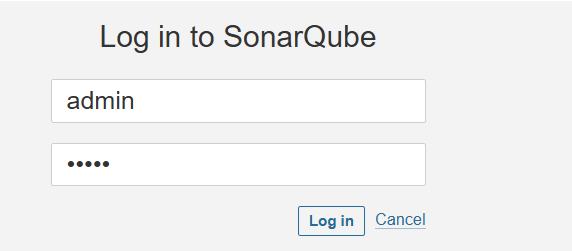
9. Access SonarQube Web UI

Navigate to http://<your-server-ip>:9000 in your browser.

Default credentials:

  • Username: admin

  • Password: admin
    (Update the password at first login!)


Integrating with GitHub

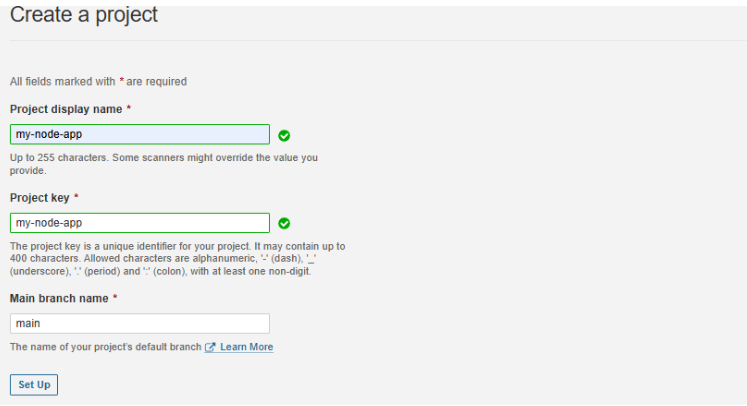
  • Create a new project in SonarQube.

  • Generate an authentication token via the UI.

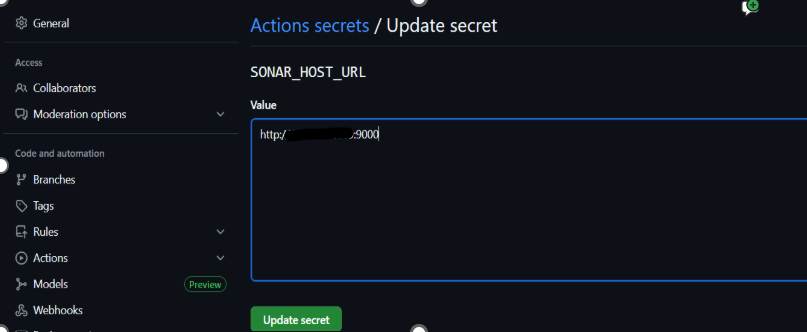
  • In your GitHub repository’s Settings > Secrets, add:

    • SONAR_TOKEN (your generated token)

    • SONAR_HOST_URL (e.g., http://<your-server-ip>:9000)

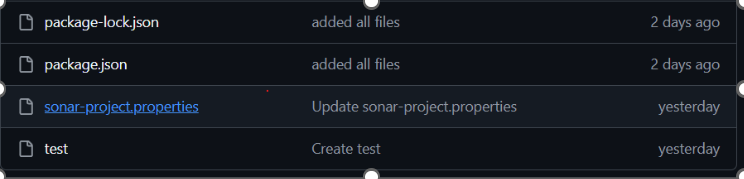
  • Add a sonar-project.properties file to your repository.

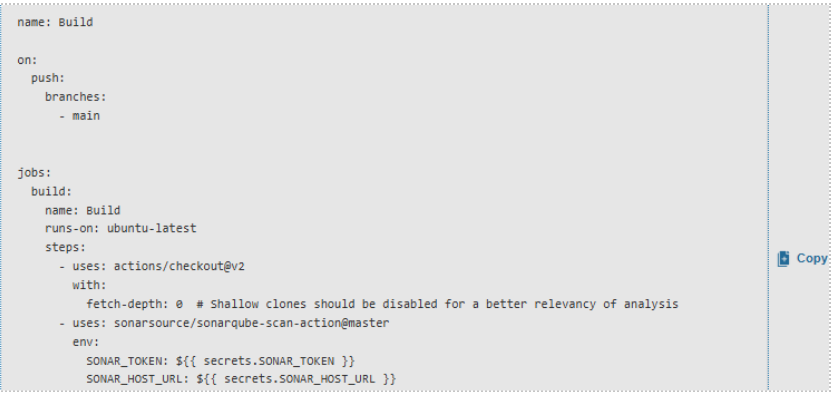
  • Add or update your GitHub Actions workflow (.github/workflows/build.yml) to include SonarQube analysis.

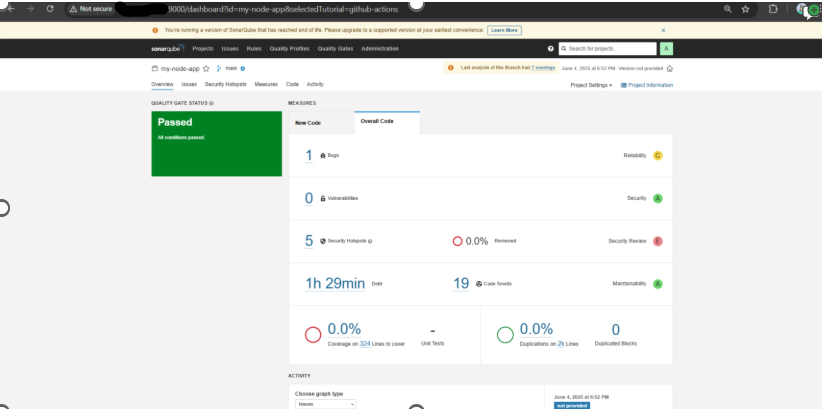
Every push to your main branch will now trigger code analysis, with results available in the SonarQube dashboard.

Final Thoughts:

With this setup, your teams gain immediate, actionable feedback on code quality and security, promoting cleaner code and faster delivery. This SonarQube server becomes a cornerstone of your DevOps toolchain, catalyzing better collaboration and continuous improvement.